
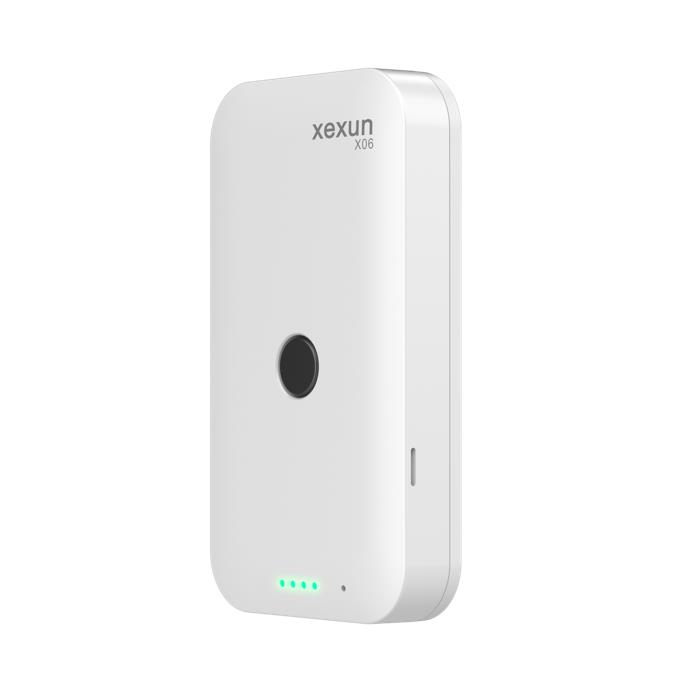


The X06 GPS/Beidou Positioning Badge is a Factory IL GPS compatible wearable GPS tracker designed for reliable people-location management. Built for daily use in education, eldercare, corporate attendance and security scenarios, the X06 fuses GPS and BeiDou with WiFi and LBS to deliver faster, more accurate positioning and smooth integration with Factory IL GPS for real-time tracking and alerting. Its compact badge form factor, integrated voice module and long standby make it a practical choice where unobtrusive continuous monitoring is required.
As a Factory IL GPS compatible device, the X06 transmits position and status over domestic 2G/3G/4G cellular networks to cloud platforms and mobile apps. That combination gives managers instant access to location, historical tracks, geofence alerts and SOS events through Factory IL GPS’s interface, while retaining local buffering and retransmission when coverage is interrupted. The result is dependable situational awareness and faster incident response for personnel and targeted groups.
Key Highlights
- Factory IL GPS compatible wearable GPS tracker for personnel monitoring, enabling real-time tracking on Factory IL GPS dashboards and mobile apps.
- Multi-source positioning (GPS + BeiDou + WiFi + LBS) for improved fix speed and typical accuracy of <10 m in open-sky conditions.
- Built-in 1000 mAh rechargeable battery with about 2-hour charge time and up to ~5 days standby (one report per hour), suitable for continuous daily use.
- SOS emergency alarm (long-press SOS) and two-way voice calling for rapid incident response and caregiver communication.
- Geofence (electronic fence) alerts, blind-area buffering and retransmission to ensure no events are lost during temporary signal loss.
- Incoming-call whitelist and remote OTA firmware upgrade for secure communications and simplified device maintenance.
- Badge-style, eco-friendly plastic housing (88 × 49 × 15 mm, ~60 g) for unobtrusive wear and easy deployment at scale.
How It Works with Factory IL GPS
When the X06 is provisioned as a Factory IL GPS compatible tracker, it forwards position updates, alarms and status messages through its cellular connection to the vendor cloud and into Factory IL GPS. Factory IL GPS displays live location, plays back historical tracks and raises geofence or low-battery alerts—enabling centralized monitoring and reporting. The X06’s buffering logic ensures continuity: if cellular service is lost, location records are held locally and retransmitted automatically when connectivity returns.
- Real-time location and telemetry updates delivered to Factory IL GPS for live monitoring and historical playback.
- SOS emergency alarm and two-way voice for fast response; incoming-call whitelist reduces nuisance calls.
- Geofence alerts and timed interval tracking (automatic position reporting) available in Factory IL GPS rule sets.
- Blind-area data buffering and retransmission to prevent gaps in reporting during temporary outages.
- OTA firmware upgrade support for remote management and feature updates through the cloud platform used with Factory IL GPS.
Technical Overview
| Model | X06 GPS/Beidou Positioning Badge |
|---|---|
| Positioning | GPS + BeiDou + WiFi + LBS hybrid |
| Positioning Accuracy | <10 m (typical, environment-dependent) |
| Connectivity | Domestic 2G / 3G / 4G cellular networks |
| Bands | Not specified (network support is region-dependent) |
| Power & Battery | Built-in 1000 mAh polymer Li‑ion; charge DC 5V; charge time ~2 hours; standby ~5 days (one report/hour) |
| Interfaces & Inputs | SOS button (long-press), two-way voice module, incoming-call whitelist; charging via DC 5V |
| GNSS | GPS/BeiDou with WiFi/LBS assistance |
| Bluetooth | Not specified |
| Remote Management | Vendor cloud platform and mobile app; OTA firmware upgrade supported |
| Form Factor | Badge-style; 88 × 49 × 15 mm; weight approx. 60 g; eco-friendly plastic |
| Environmental | Operating: -20°C to +75°C; Storage: -40°C to +85°C |
Use Cases
- Student safety and location monitoring on campus—real-time tracking and geofence alerts for pick-up/drop-off zones.
- Eldercare monitoring with SOS and two-way voice for rapid caregiver communication during incidents.
- Corporate attendance and staff location for workforce management and quick roll-call in security events.
- Security patrols and lone-worker protection where wearable form factor and voice connectivity matter.
- Light asset or tagged-equipment tracking where a compact badge-style GPS tracker offers low-obtrusion monitoring.
Why Choose This Tracker with Factory IL GPS
The X06 delivers a focused, people-centric tracking solution that pairs well with Factory IL GPS’s platform capabilities. As a Factory IL GPS compatible GPS tracker, it combines multi-source positioning, SOS and voice features with cloud-based management and OTA updates—helping organizations achieve consistent real-time tracking, fast incident response and easy fleet-of-people administration. While vehicle-focused Factory IL GPS compatible devices often emphasize telemetry for ignition, immobilizer control or fuel monitoring, the X06 is optimized for personnel safety, attendance and lightweight asset scenarios where continuous wearability, reliable location fixes and simple cloud integration are the priority.
Deploy the X06 where dependable people-tracking and fast situational awareness matter: integrate the badge into Factory IL GPS to centralize alerts, historical playback and management workflows, reduce manual checks, and improve response times without added operational complexity.
Set Up X06
To set the tracker send the following commands by SMS messages, the sample setup the device password is KV8RGD, this password is the default
- Restore factory settings
beginKV8RGD - Set the operator APN
apnKV8RGD {{apn}} - Set the APN username
apnuserKV8RGD {{apnu}} - Set the APN password
apnpasswdKV8RGD {{apnp}} - Set the GPRS server
adminipKV8RGD 54.85.159.138 8888 - Set the GPRS mode
gprsmodeKV8RGD - Set the update interval 60 seconds
t060s***nKV8RGD